Guide · PDF
How to type on a PDF that isn't fillable
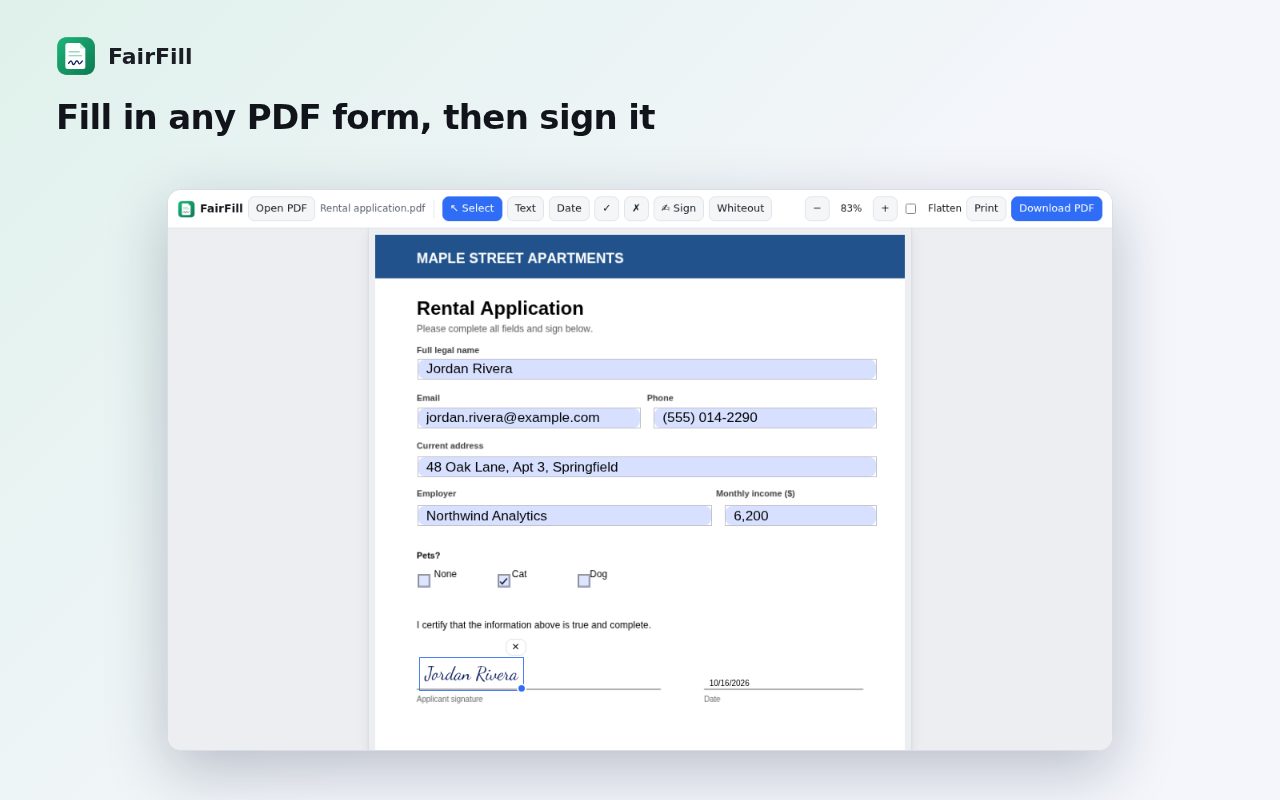
Many forms are just scanned or printed-to-PDF pages with no form fields, so clicking on them does nothing. Instead of printing, filling by hand and scanning again, you can place text on top of the page.
Step by step
Add FairFill to Chrome
Install FairFill from the Chrome Web Store. It's free with no account.
Open the PDF
Click the FairFill icon while viewing the PDF in Chrome, drag the file onto FairFill, or right-click a PDF link and choose “Fill & sign this PDF with FairFill”.
Pick the Text tool and click
Click on the line where the answer goes and type. Drag the text to adjust its position.
Add dates, ticks and a signature
Use the date, checkmark and cross tools for boxes, and Sign to draw, type or upload your signature.
Download
Click Download. The text is written into the PDF, so it looks the same on any device.
Tips
- Use Whiteout to cover a printed mistake or an old answer before typing over it.
- Flatten the form before sending it if the receiver shouldn't be able to change it.
Other ways to do it
Adobe Acrobat Reader's Fill & Sign tool can also type on flat PDFs on a desktop. On a phone, the Files or Drive apps can add simple markup to PDFs.
Questions
Do I need to convert the PDF to Word first?
No. You type directly on top of the PDF page.
Do my PDFs get uploaded?
No. Everything happens in your browser.
Is it really free?
Yes. Saving and printing are always free, with no watermark and no account.
More guides
- How to open a DWG file on a Chromebook
- How to fill and sign a PDF in Chrome, free
- How to take attendance in Google Meet automatically
- How to turn an email or flyer into a Google Calendar event
- How to convert a PDF to Word without uploading it
- How to record audio on a Chromebook, with no time limit
- How to use voice typing on any website in Chrome
- How to do Amazon keyword research for free
- How to combine JPG photos into one PDF without uploading them
- How to add an event from a screenshot or poster to Google Calendar
- How to search any website from Chrome's address bar